Red Hat 무료 구독을 신청했다면 아래와 같은 방법으로 진행할 수 있습니다.
Red Hat Developers | Red Hat Developer
Your Red Hat Developer membership unlocks access to product trials, learning resources, events, tools, and a community you can trust to help you stay ahead in AI and emerging tech
developers.redhat.com
먼저 RHEL의 공식 레포를 사용하기 위해서 Red Hat 계정과 연결해줍니다.
subscription-manager register --username <사용자이름> --password <비밀번호>
기본적으로 YUM 레포 정보는 /etc/yum.repos.d 경로에 위치합니다. 이 경로에 .repo 확장자를 가진 파일을 생성하면 새로운 레포지토리 정보를 등록할 수 있습니다. Red Hat 구독을 등록하면 기본적으로 redhat.repo 파일이 생성되는데, 이 파일 안에 기본적으로 활성화되어 있는 레포는 BaseOS와 AppStream입니다.
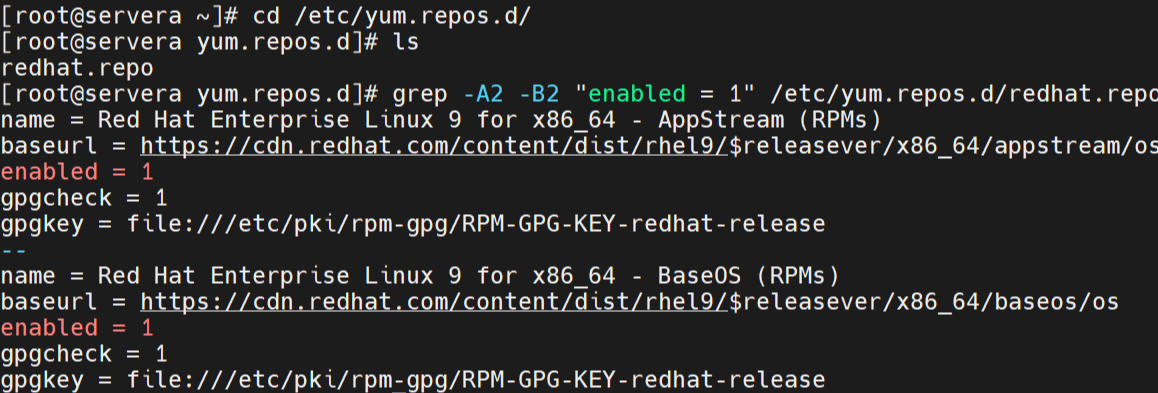
아래 명령으로 현재 활성화되어 있는 레포지토리를 확인할 수 있습니다.
subscription-manager repos --list-enabled
이렇게 레포가 활성화되어 있다면 yum 명령어를 사용해 여러 패키지들의 설치가 가능합니다.
yum install -y autofs
만약 레포지토리가 자동으로 활성화되지 않았다면 아래 명령어로 수동으로 활성화할 수 있습니다.
# 서브스크립션 연결
subscription-manager attach --auto

# 레포지토리 수동 활성화
subscription-manager repos --enable=rhel-9-for-x86_64-baseos-rpms
subscription-manager repos --enable=rhel-9-for-x86_64-appstream-rpms
'Linux' 카테고리의 다른 글
| VMware Workstation Pro 17 스냅샷(Snapshot) 찍기 (0) | 2026.03.22 |
|---|---|
| [Linux] LVM (Logical Volume Manager) 생성하고 크기 조정하기 (0) | 2026.03.03 |
| RHEL 9 root 비밀번호 분실 시 초기화 방법 (0) | 2026.02.27 |
| Swap partition을 생성하고 삭제해보자 (1) | 2026.02.26 |