LVM (Logical Volume Manager) 이란
LVM은 Logicacl Volume Manager의 약자로, 디스크를 논리적으로 관리하여 유연하게 공간을 확장하거나 축소할 수 있게 해주는 기능입니다. 따라서 LVM을 사용하면 여러 개의 디스크를 하나의 디스크처럼 사용할 수 있어 디스크 공간을 효율적으로 관리할 수 있습니다.
디스크 → 파티션 → PV → VG → LV → 파일시스템 → 마운트
자주 사용하는 확인 명령어
아래 항목들은 LVM을 생성하고 파일 시스템을 마운트 하는 과정에서 자주 사용되는 명령어와 설정 파일입니다.
# 시스템 블록 디바이스 구조 확인
lsblk

# 현재 마운트된 파일 시스템 확인
df -Th

# 시스템 부팅 시 파일 시스템을 자동 마운트 설정 파일
/etc/fstab
fdisk를 이용한 LVM 파티션 생성
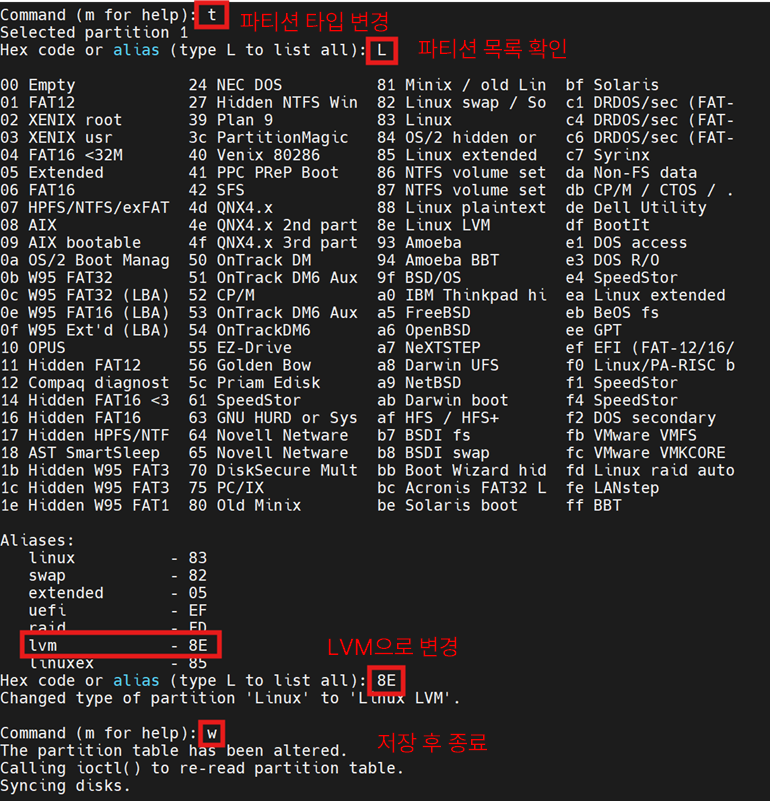
디스크 /dev/sda에 새로운 파티션을 생성해보도록 하겠습니다.
fdisk /dev/sda
t 옵션을 통해 파티션 타입을 lvm(8E)로 변경해줍니다.

Physical Volume(PV) 생성
[root@localhost ~]# pvcreate /dev/sda1
  Physical volume "/dev/sda1" successfully created.
[root@localhost ~]# pvdisplay
  --- Physical volume ---
  PV Name               /dev/nvme0n1p3
  VG Name               rhel
  PV Size               18.41 GiB / not usable 2.00 MiB
  Allocatable           yes (but full)
  PE Size               4.00 MiB
  Total PE              4713
  Free PE               0
  Allocated PE          4713
  PV UUID               xy7xZP-FoxU-LP15-pFBv-zrsv-1f91-d9PLlt

  "/dev/sda1" is a new physical volume of "477.00 MiB"
  --- NEW Physical volume ---
  PV Name               /dev/sda1
  VG Name
  PV Size               477.00 MiB
  Allocatable           NO
  PE Size               0
  Total PE              0
  Free PE               0
  Allocated PE          0
  PV UUID               s5WKho-os9C-M0MT-0W61-K2NF-4Lqw-7w63oH
Volume Group (VG) 생성
[root@localhost ~]# vgcreate -s 8MB wgroup /dev/sda1
  Volume group "wgroup" successfully created
[root@localhost ~]# vgdisplay
  --- Volume group ---
  VG Name               rhel
  System ID
  Format                lvm2
  Metadata Areas        1
  Metadata Sequence No  3
  VG Access             read/write
  VG Status             resizable
  MAX LV                0
  Cur LV                2
  Open LV               2
  Max PV                0
  Cur PV                1
  Act PV                1
  VG Size               18.41 GiB
  PE Size               4.00 MiB
  Total PE              4713
  Alloc PE / Size       4713 / 18.41 GiB
  Free  PE / Size       0 / 0
  VG UUID               OAn4YI-Yetn-ShRa-78Cf-99zd-bIjI-J9muQF

  --- Volume group ---
  VG Name               wgroup
  System ID
  Format                lvm2
  Metadata Areas        1
  Metadata Sequence No  1
  VG Access             read/write
  VG Status             resizable
  MAX LV                0
  Cur LV                0
  Open LV               0
  Max PV                0
  Cur PV                1
  Act PV                1
  VG Size               472.00 MiB
  PE Size               8.00 MiB
  Total PE              59
  Alloc PE / Size       0 / 0
  Free  PE / Size       59 / 472.00 MiB
  VG UUID               uWTymK-j3Tl-44bN-E5oq-KRJP-hh7z-8WpMy0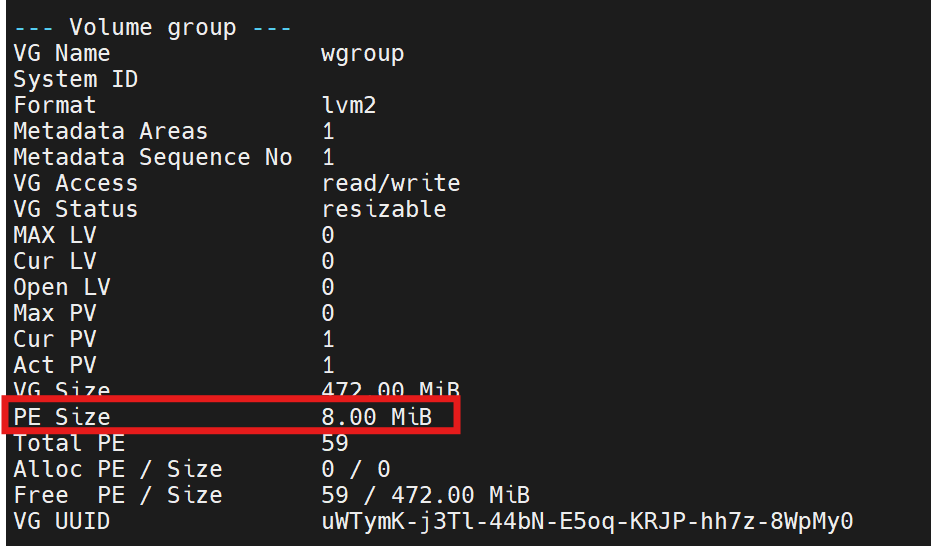
Logical Volume (LV) 생성
[root@localhost ~]# lvcreate -l 50 -n wshare /dev/wgroup
WARNING: ext4 signature detected on /dev/wgroup/wshare at offset 1080. Wipe it? [y/n]: y
  Wiping ext4 signature on /dev/wgroup/wshare.
  Logical volume "wshare" created.
[root@localhost ~]# lvdisplay
  --- Logical volume ---
  LV Path                /dev/rhel/swap
  LV Name                swap
  VG Name                rhel
  LV UUID                qo12T7-MbQd-e0TR-p1l6-ouAD-Lnq9-wV2eAl
  LV Write Access        read/write
  LV Creation host, time localhost.localdomain, 2026-02-22 23:01:32 +0900
  LV Status              available
  # open                 2
  LV Size                2.00 GiB
  Current LE             512
  Segments               1
  Allocation             inherit
  Read ahead sectors     auto
  - currently set to     256
  Block device           253:1

  --- Logical volume ---
  LV Path                /dev/rhel/root
  LV Name                root
  VG Name                rhel
  LV UUID                WyzEDs-oNnz-QqEq-WZlc-Pq3c-GO11-Ld04R9
  LV Write Access        read/write
  LV Creation host, time localhost.localdomain, 2026-02-22 23:01:32 +0900
  LV Status              available
  # open                 1
  LV Size                16.41 GiB
  Current LE             4201
  Segments               1
  Allocation             inherit
  Read ahead sectors     auto
  - currently set to     256
  Block device           253:0

  --- Logical volume ---
  LV Path                /dev/wgroup/wshare
  LV Name                wshare
  VG Name                wgroup
  LV UUID                MW9CfX-4AO8-XevM-dAEW-mqLa-4fef-gjMJec
  LV Write Access        read/write
  LV Creation host, time localhost.localdomain, 2026-03-03 21:40:14 +0900
  LV Status              available
  # open                 0
  LV Size                400.00 MiB
  Current LE             50
  Segments               1
  Allocation             inherit
  Read ahead sectors     auto
  - currently set to     256
  Block device           253:2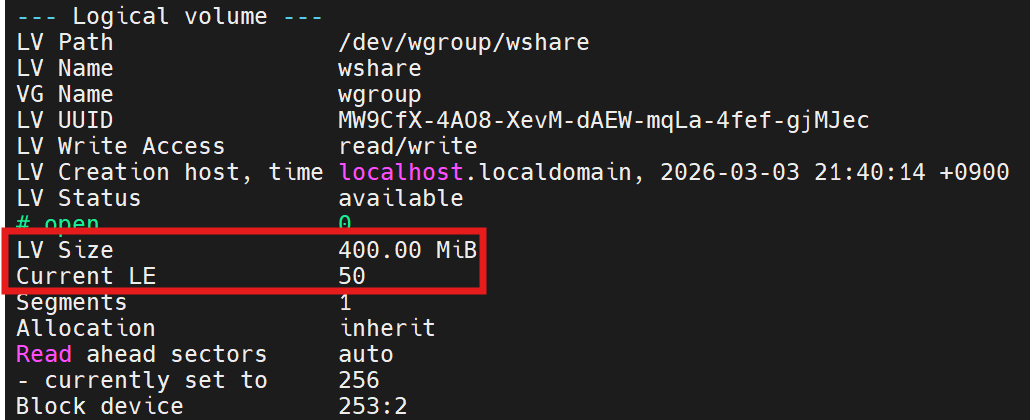
파일 시스템 생성 및 마운트 설정
mkfs.ext4 /dev/wgroup/wshare
lsblk -f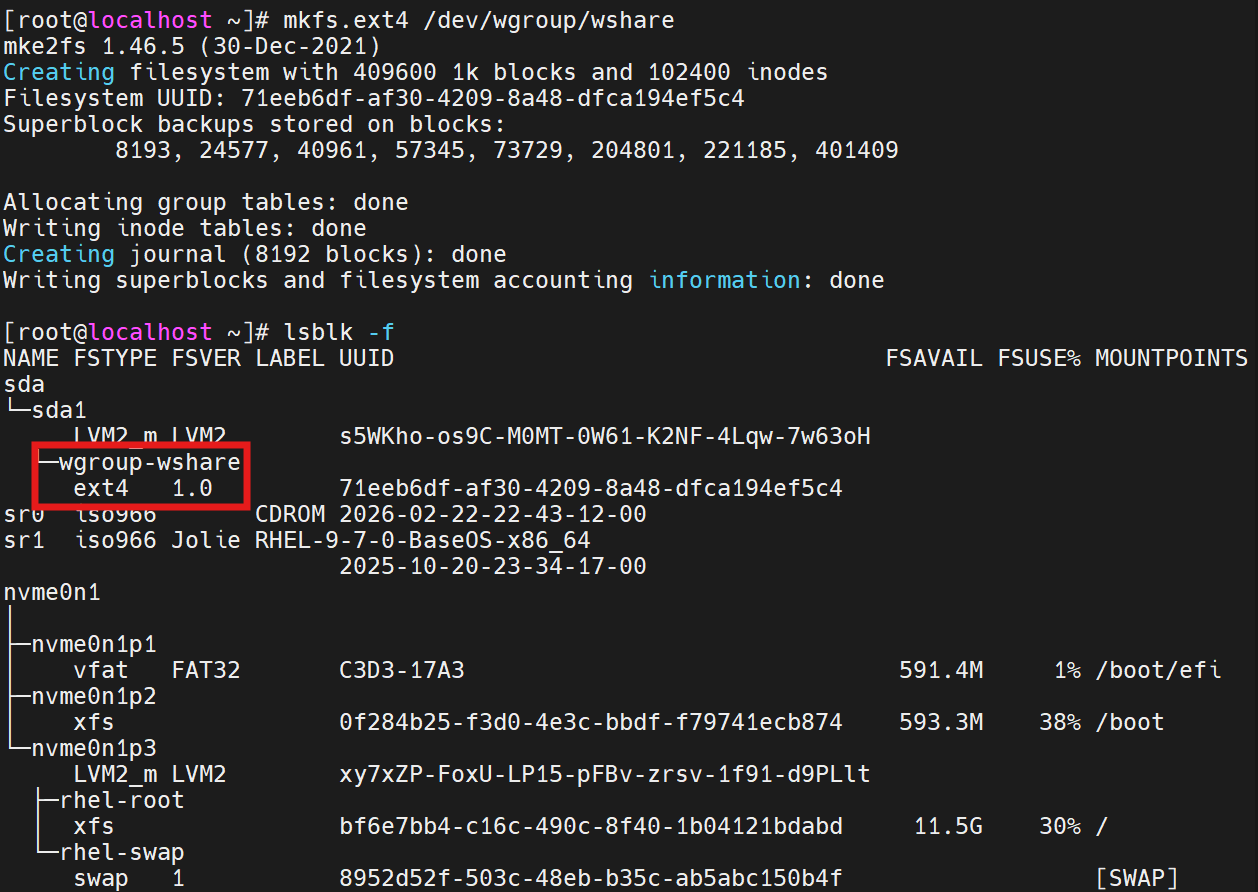
# 마운트 디렉터리 생성
mkdir /mnt/wshare

# 자동 마운트 설정
vi /etc/fstab

-----------------------------------------------------------
/dev/wgroup/wshare   /mnt/wshare  ext4   defaults  0 0
-----------------------------------------------------------

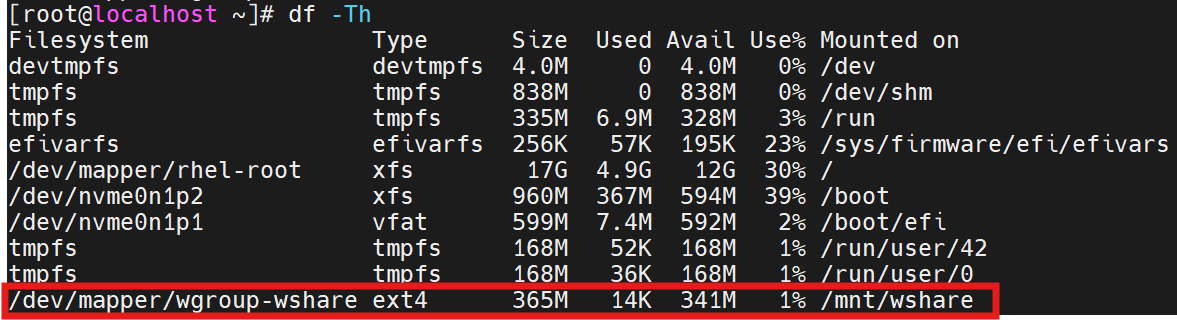
mount -a
df -Th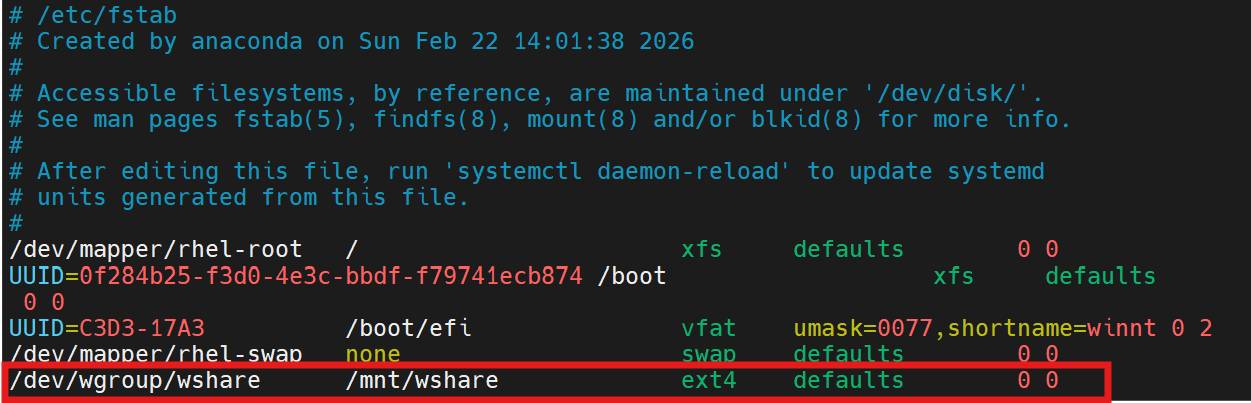
Logical Volume 크기 조정(reduce)
LV(Logical Volume)의 크기를 280M로 줄여보겠습니다. LV를 축소하기 위해서는 파일 시스템 마운트를 해제하고 파일 시스템 크기를 줄인 후에 LV를 줄여야 합니다.
# ext4 파일 시스템 크기 확인
df -h /mnt/wshare

# LV 크기 확인
lvs
lvdisplay /dev/wgroup/wshare
# 마운트 해제
umount /mnt/wshare

# 파일 시스템 검사
e2fsck -f /dev/wgroup/wshare

# 파일 시스템 축소
resize2fs /dev/wgroup/wshare 280M

# LV 축소
lvreduce -L 280M /dev/wgroup/wshare

# 다시 마운트(/etc/fstab 기준으로)
mount -a
df -h
Logical Volume 크기 조정(extend)
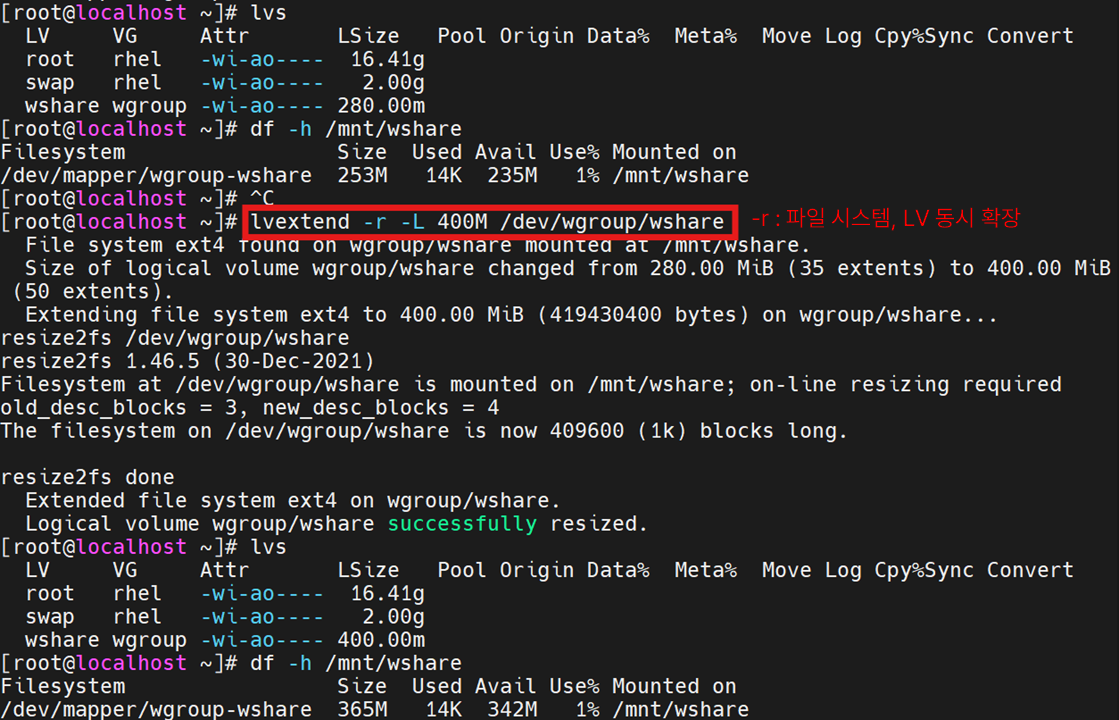
확장은 축소와 달리 마운트 해제(umount) 없이 가능하며, -r 옵션을 통해 파일 시스템과 LV를 동시에 늘릴 수 있습니다.
LVM 삭제 및 초기화
# 마운트 해제
umount /mnt/wshare

# fstab에서 자동 마운트 삭제
vi /etc/fstab

# LV 삭제
lvremove /dev/wgroup/wshare

# VG 삭제
vgremove wgroup

# PV 삭제
pvremove /dev/sda1

# 파티션 삭제
fdisk /dev/sda
d
w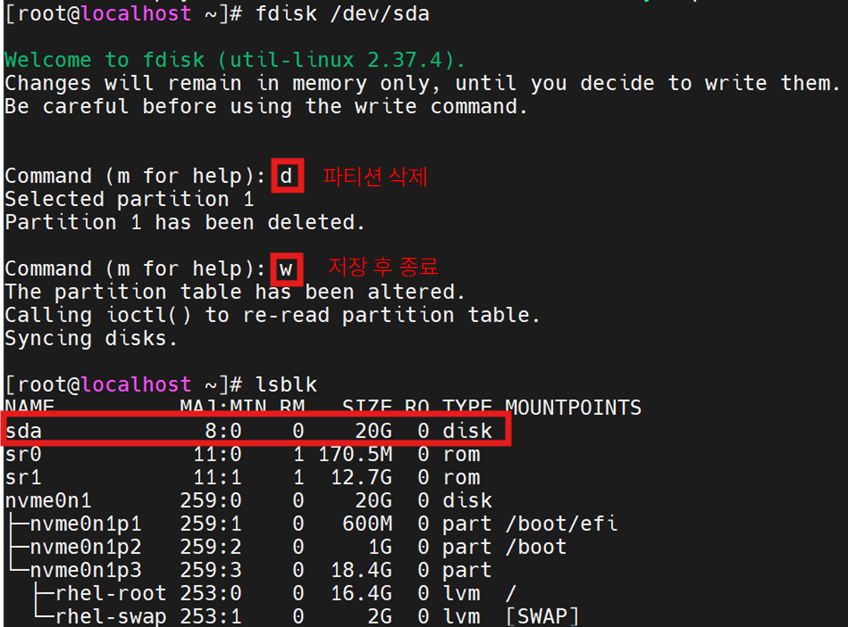
'Linux' 카테고리의 다른 글
| VMware Workstation Pro 17 스냅샷(Snapshot) 찍기 (0) | 2026.03.22 |
|---|---|
| [Linux] Red Hat 구독 등록하고 레포지토리 구축 (0) | 2026.03.08 |
| RHEL 9 root 비밀번호 분실 시 초기화 방법 (0) | 2026.02.27 |
| Swap partition을 생성하고 삭제해보자 (1) | 2026.02.26 |